> ## Documentation Index
> Fetch the complete documentation index at: https://docs.novu.co/llms.txt
> Use this file to discover all available pages before exploring further.
# Expo Push Push Integration with Novu
> Connect Expo Push to Novu to send push notifications to Expo-managed iOS and Android apps through workflows using Expo push tokens and access credentials.
This guide explains the process of configuring and using Expo Push with Novu, from getting your credentials to sending your first notification.
## How to configure Expo with Novu
Before you can send notifications, you must connect your Expo project to Novu by generating an access token and adding it to your integration settings.
### Step 1: Generate your access token from Expo Push
Generate an access token from your dashboard. This token authorizes Novu to send notifications on behalf of your project.
Sign in at the [Expo console](https://expo.dev/).
Navigate to the **Credentials** section in the project settings sidebar.
Click [**Access Token**](https://expo.dev/settings/access-tokens).
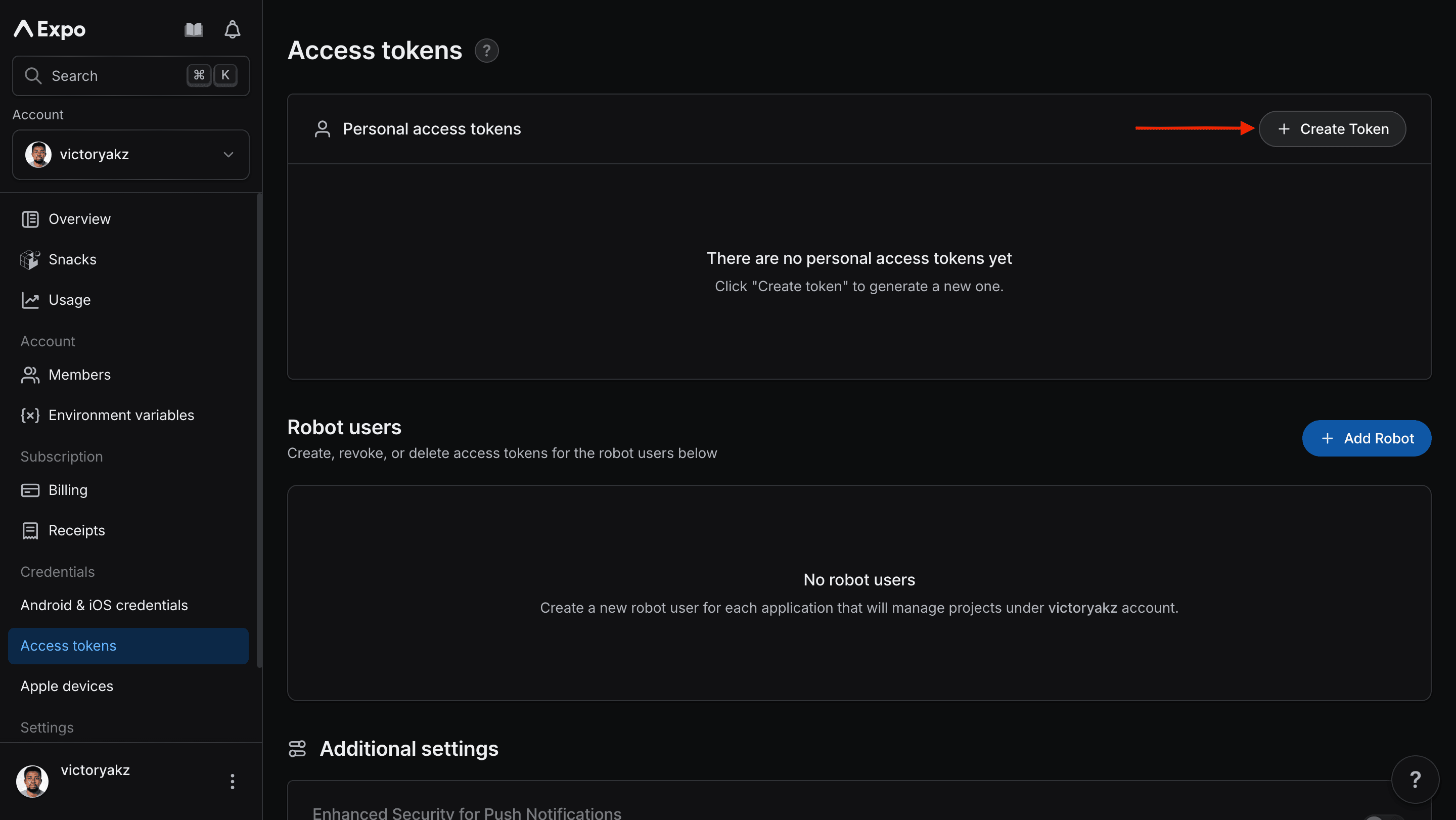 A menu appears.
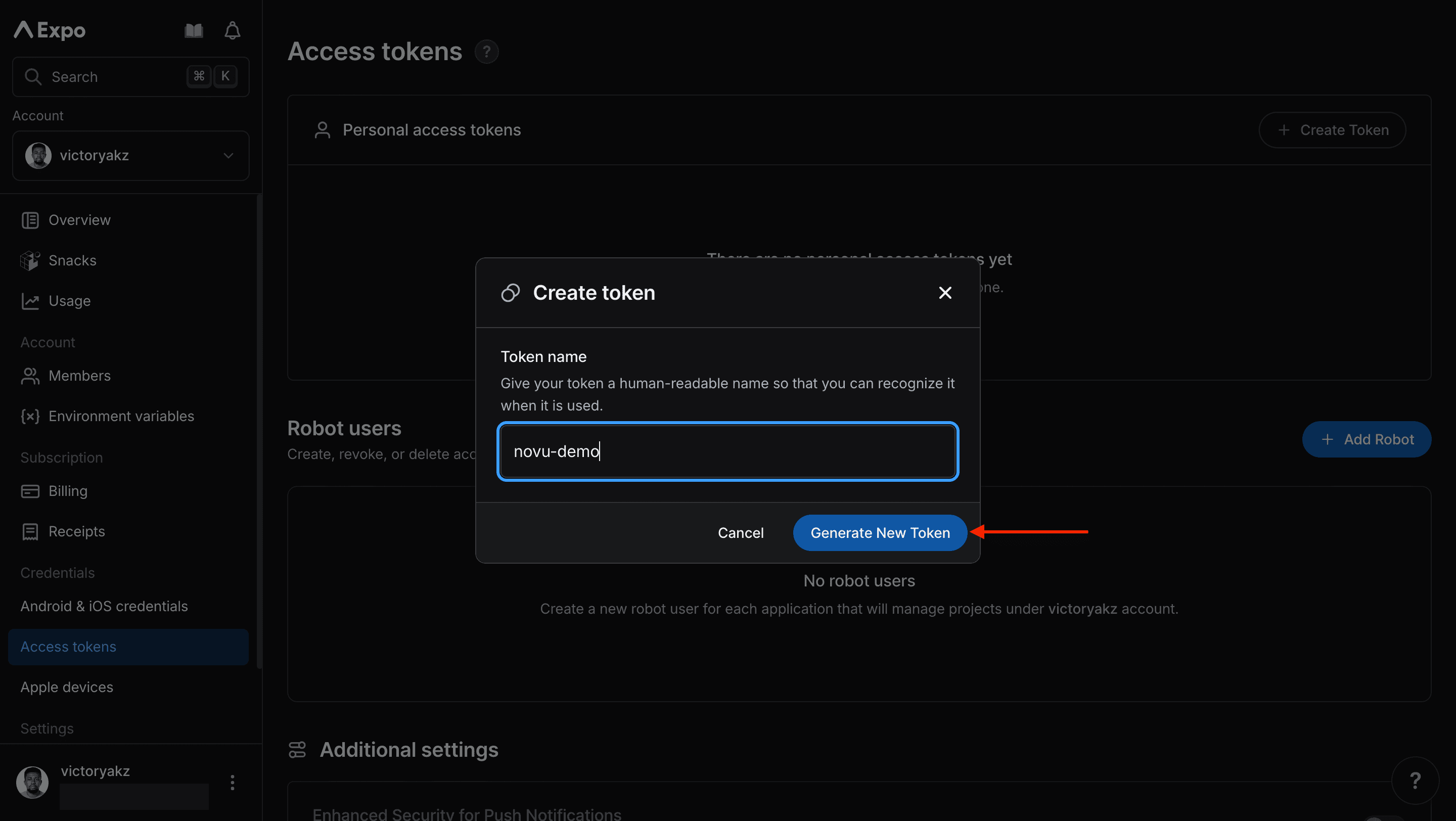
Give it a descriptive name, and then click **Generate New Token**.
A menu appears.
Give it a descriptive name, and then click **Generate New Token**.
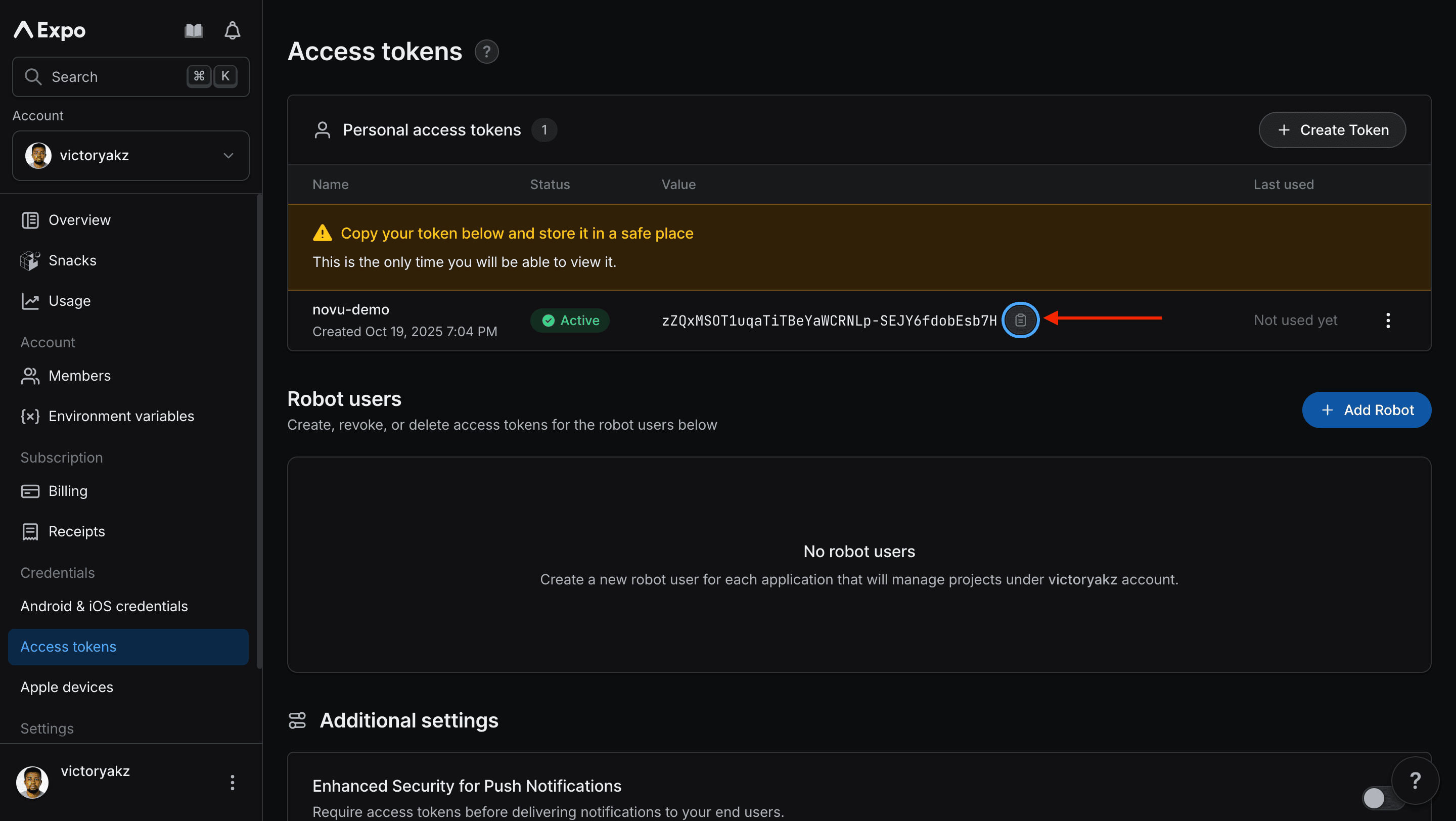
 Copy and save the generated access token. You need it in the next step.
 ### Step 2: Connect Expo Push to Novu
Next, add the access token to your Expo integration in the Novu dashboard.
Open the [Novu Dashboard](https://dashboard.novu.co).
On the Novu dashboard, navigate to the **Integration Store**.
In the **Integration Store**, click **Connect provider** to begin setup.
In the **Push** tab, choose **Expo Push** from the provider list.
In the Expo integration form, paste the access token that you copied from Expo into the **Access Token** field.
### Step 2: Connect Expo Push to Novu
Next, add the access token to your Expo integration in the Novu dashboard.
Open the [Novu Dashboard](https://dashboard.novu.co).
On the Novu dashboard, navigate to the **Integration Store**.
In the **Integration Store**, click **Connect provider** to begin setup.
In the **Push** tab, choose **Expo Push** from the provider list.
In the Expo integration form, paste the access token that you copied from Expo into the **Access Token** field.
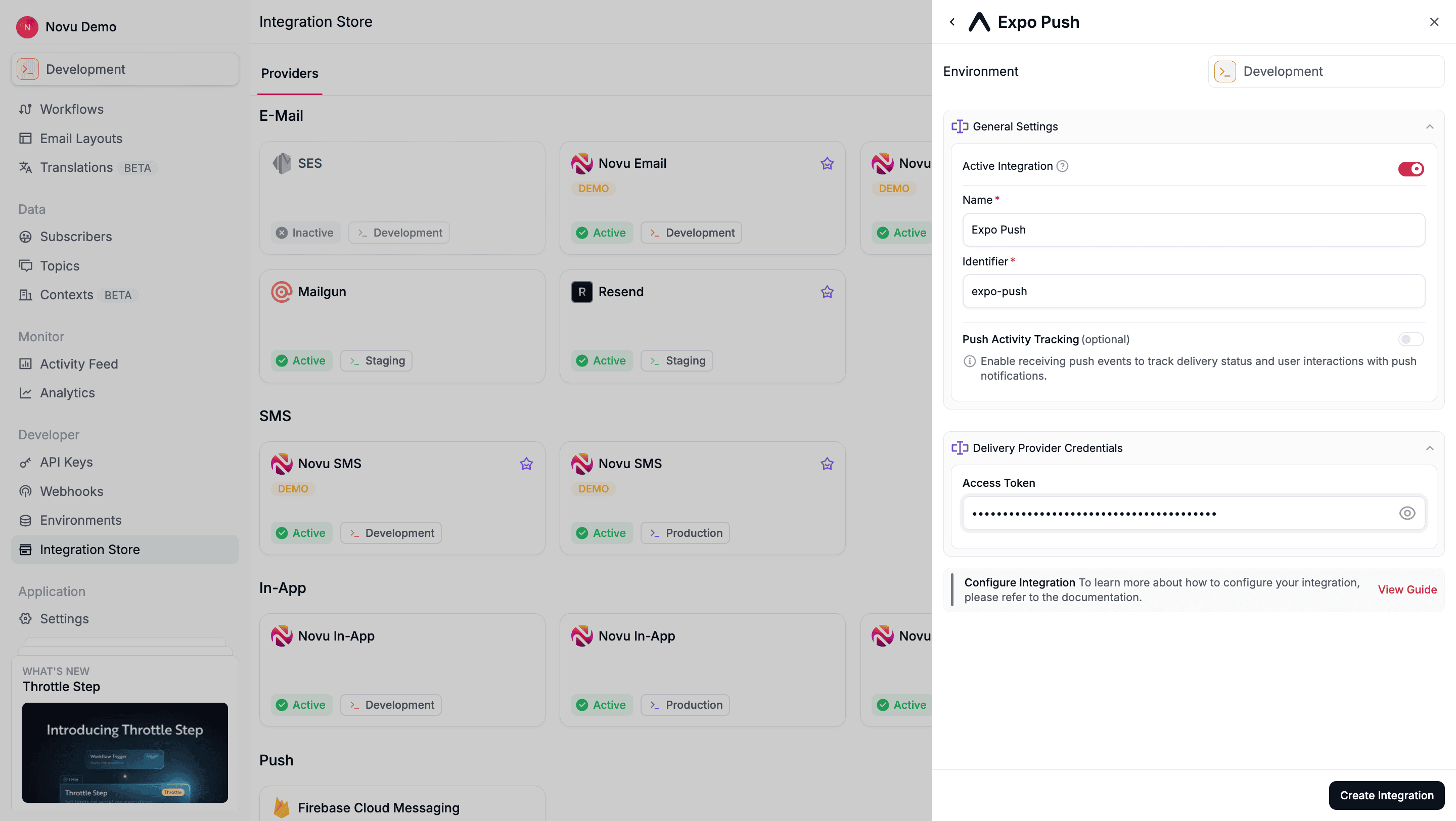 Review your credentials, then click **Create Integration** to save.
## Using Expo Push with Novu
Once your integration is configured, you can start sending push notifications by registering your subscribers' device tokens and triggering a workflow.
### Step 1: Add subscriber device token
Before Novu can send a push notification to a subscriber (user), you must associate their device's unique push token with their Novu subscriber profile.
You can do this by making an API call to [update the subscriber's credentials](/api-reference/subscribers/update-provider-credentials).
```typescript theme={null}
import { Novu } from '@novu/api';
import { ChatOrPushProviderEnum } from "@novu/api/models/components";
const novu = new Novu({ secretKey: "" });
await novu.subscribers.credentials.update(
{
providerId: ChatOrPushProviderEnum.Expo,
integrationIdentifier: "string",
credentials: { deviceTokens: ["token1", "token2"] },
},
"subscriberId"
);
```
```python theme={null}
import os
import novu_py
from novu_py import Novu
with Novu(secret_key=os.getenv("NOVU_SECRET_KEY", "")) as novu:
novu.subscribers.credentials.update(
subscriber_id="subscriberId",
update_subscriber_channel_request_dto={
"provider_id": novu_py.ChatOrPushProviderEnum.EXPO,
"credentials": {"deviceTokens": ["token1", "token2"]},
"integration_identifier": "string",
},
)
```
```go theme={null}
import (
"context"
"os"
novugo "github.com/novuhq/novu-go"
"github.com/novuhq/novu-go/models/components"
)
s := novugo.New(novugo.WithSecurity(os.Getenv("NOVU_SECRET_KEY")))
res, err := s.Subscribers.Credentials.Update(context.Background(), "subscriberId", components.UpdateSubscriberChannelRequestDto{
ProviderID: components.ChatOrPushProviderEnumExpo,
IntegrationIdentifier: novugo.String("string"),
Credentials: components.ChannelCredentials{
DeviceTokens: []string{"token1", "token2"},
},
}, nil)
```
```php theme={null}
use novu;
use novu\Models\Components;
$sdk = novu\Novu::builder()->setSecurity('')->build();
$sdk->subscribersCredentials->update(
subscriberId: 'subscriberId',
updateSubscriberChannelRequestDto: new Components\UpdateSubscriberChannelRequestDto(
providerId: Components\ChatOrPushProviderEnum::Expo,
integrationIdentifier: 'string',
credentials: new Components\ChannelCredentials(
deviceTokens: ['token1', 'token2'],
),
),
);
```
```csharp theme={null}
using Novu;
using Novu.Models.Components;
using System.Collections.Generic;
var sdk = new NovuSDK(secretKey: "");
await sdk.Subscribers.Credentials.UpdateAsync(
subscriberId: "subscriberId",
updateSubscriberChannelRequestDto: new UpdateSubscriberChannelRequestDto() {
ProviderId = ChatOrPushProviderEnum.Expo,
IntegrationIdentifier = "string",
Credentials = new ChannelCredentials() {
DeviceTokens = new List { "token1", "token2" },
},
});
```
```java theme={null}
import co.novu.Novu;
import co.novu.models.components.*;
import java.util.List;
Novu novu = Novu.builder().secretKey("").build();
novu.subscribers().credentials().update()
.subscriberId("subscriberId")
.body(UpdateSubscriberChannelRequestDto.builder()
.providerId(ChatOrPushProviderEnum.EXPO)
.integrationIdentifier("string")
.credentials(ChannelCredentials.builder()
.deviceTokens(List.of("token1", "token2"))
.build())
.build())
.call();
```
```bash theme={null}
curl -L -X PUT 'https://api.novu.co/v1/subscribers//credentials' \
-H 'Content-Type: application/json' \
-H 'Authorization: ApiKey ' \
-d '{
"providerId": "expo",
"credentials": {
"deviceTokens": [
"token1",
"token2"
]
},
"integrationIdentifier": "string"
}'
```
Novu automatically removes invalid device tokens from a subscribers' profile and then sends the failure details to the `MESSAGE_FAILED` webhook.
### Step 2: Send a notification
Now you're ready to send a push notification.
```typescript theme={null}
import { Novu } from '@novu/api';
const novu = new Novu({ secretKey: "" });
await novu.trigger({
workflowId: "workflowId",
to: { subscriberId: "SUBSCRIBER_ID", },
payload: {},
});
```
```python theme={null}
import os
import novu_py
from novu_py import Novu
with Novu(secret_key=os.getenv("NOVU_SECRET_KEY", "")) as novu:
novu.trigger(trigger_event_request_dto=novu_py.TriggerEventRequestDto(
workflow_id="workflowId",
to={"subscriber_id": "SUBSCRIBER_ID"},
payload={},
))
```
```go theme={null}
import (
"context"
"os"
novugo "github.com/novuhq/novu-go"
"github.com/novuhq/novu-go/models/components"
)
s := novugo.New(novugo.WithSecurity(os.Getenv("NOVU_SECRET_KEY")))
res, err := s.Trigger(context.Background(), components.TriggerEventRequestDto{
WorkflowID: "workflowId",
To: components.CreateToSubscriberPayloadDto(components.SubscriberPayloadDto{
SubscriberID: "SUBSCRIBER_ID",
}),
Payload: map[string]any{},
}, nil)
```
```php theme={null}
use novu;
use novu\Models\Components;
$sdk = novu\Novu::builder()->setSecurity('')->build();
$sdk->trigger(
triggerEventRequestDto: new Components\TriggerEventRequestDto(
workflowId: 'workflowId',
to: new Components\SubscriberPayloadDto(subscriberId: 'SUBSCRIBER_ID'),
payload: {},
),
);
```
```csharp theme={null}
using Novu;
using Novu.Models.Components;
var sdk = new NovuSDK(secretKey: "");
await sdk.TriggerAsync(triggerEventRequestDto: new TriggerEventRequestDto() {
WorkflowId = "workflowId",
To = To.CreateSubscriberPayloadDto(new SubscriberPayloadDto() { SubscriberId = "SUBSCRIBER_ID" }),
Payload = {},
});
```
```java theme={null}
import co.novu.Novu;
import co.novu.models.components.*;
Novu novu = Novu.builder().secretKey("").build();
novu.trigger()
.body(TriggerEventRequestDto.builder()
.workflowId("workflowId")
.to(To2.of(SubscriberPayloadDto.builder().subscriberId("SUBSCRIBER_ID").build()))
.payload({})
.build())
.call();
```
```bash theme={null}
curl --location 'https://api.novu.co/v1/events/trigger' \
--header 'Content-Type: application/json' \
--header 'Authorization: ApiKey ' \
-d '{
"name": "workflowId",
"to": [
"SUBSCRIBER_ID"
],
"payload": {}
}'
```
## Configure Expo overrides
Save an Expo override on the Push step when you need Expo Push fields beyond the step subject and body — for example `data`, `sound`, `priority`, or `ttl`. The override is stored on the step, so it is versioned and promoted with the workflow, and every trigger sends it without changing your trigger call.
Provider content overrides in the workflow editor are rolling out gradually and may not be available on your Push step yet. Overrides passed at trigger time work regardless. See [provider content overrides](/platform/integrations/push#provider-content-overrides).
Expo overrides are validated against the [Expo Push message](https://docs.expo.dev/push-notifications/sending-notifications) request format. The editor autocompletes supported field names, validates the JSON, and flags unsupported fields.
* **`to` is managed by Novu.** Novu fills device tokens from the subscriber's credentials — do not set `to` in the override.
* **`body` falls back from the step.** If your override omits `body`, Novu uses the rendered Push step body.
* **`title` is not seeded.** Set `title` in the override when you want one; Novu does not copy the step subject automatically.
See the [Expo Push message format](https://docs.expo.dev/push-notifications/sending-notifications) for the full field list.
## Using overrides to customize notifications
```typescript theme={null}
import { Novu } from '@novu/api';
const novu = new Novu({ secretKey: "" });
await novu.trigger({
workflowId: "workflowId",
to: { subscriberId: "subscriber-id-123", },
payload: {
"orderId": "12345"
},
overrides: {
"providers": {
"expo": {
"title": "Order Update",
"body": "Your order #12345 has been shipped!",
"data": {
"deepLink": "myapp://orders/12345",
"orderId": "12345"
},
"sound": "default",
"priority": "high",
"ttl": 3600
}
}
},
});
```
```python theme={null}
import os
import novu_py
from novu_py import Novu
with Novu(secret_key=os.getenv("NOVU_SECRET_KEY", "")) as novu:
novu.trigger(trigger_event_request_dto=novu_py.TriggerEventRequestDto(
workflow_id="workflowId",
to={"subscriber_id": "subscriber-id-123"},
payload={
"orderId": "12345"
},
overrides={
"providers": {
"expo": {
"title": "Order Update",
"body": "Your order #12345 has been shipped!",
"data": {
"deepLink": "myapp://orders/12345",
"orderId": "12345"
},
"sound": "default",
"priority": "high",
"ttl": 3600
}
}
},
))
```
```go theme={null}
import (
"context"
"os"
novugo "github.com/novuhq/novu-go"
"github.com/novuhq/novu-go/models/components"
)
s := novugo.New(novugo.WithSecurity(os.Getenv("NOVU_SECRET_KEY")))
res, err := s.Trigger(context.Background(), components.TriggerEventRequestDto{
WorkflowID: "workflowId",
To: components.CreateToSubscriberPayloadDto(components.SubscriberPayloadDto{
SubscriberID: "subscriber-id-123",
}),
Payload: map[string]any{
"orderId": "12345"
},
Overrides: map[string]any{
"providers": {
"expo": {
"title": "Order Update",
"body": "Your order #12345 has been shipped!",
"data": {
"deepLink": "myapp://orders/12345",
"orderId": "12345"
},
"sound": "default",
"priority": "high",
"ttl": 3600
}
}
},
}, nil)
```
```php theme={null}
use novu;
use novu\Models\Components;
$sdk = novu\Novu::builder()->setSecurity('')->build();
$sdk->trigger(
triggerEventRequestDto: new Components\TriggerEventRequestDto(
workflowId: 'workflowId',
to: new Components\SubscriberPayloadDto(subscriberId: 'subscriber-id-123'),
payload: {
"orderId": "12345"
},
overrides: {
"providers": {
"expo": {
"title": "Order Update",
"body": "Your order #12345 has been shipped!",
"data": {
"deepLink": "myapp://orders/12345",
"orderId": "12345"
},
"sound": "default",
"priority": "high",
"ttl": 3600
}
}
},
),
);
```
```csharp theme={null}
using Novu;
using Novu.Models.Components;
var sdk = new NovuSDK(secretKey: "");
await sdk.TriggerAsync(triggerEventRequestDto: new TriggerEventRequestDto() {
WorkflowId = "workflowId",
To = To.CreateSubscriberPayloadDto(new SubscriberPayloadDto() { SubscriberId = "subscriber-id-123" }),
Payload = {
"orderId": "12345"
},
Overrides = {
"providers": {
"expo": {
"title": "Order Update",
"body": "Your order #12345 has been shipped!",
"data": {
"deepLink": "myapp://orders/12345",
"orderId": "12345"
},
"sound": "default",
"priority": "high",
"ttl": 3600
}
}
},
});
```
```java theme={null}
import co.novu.Novu;
import co.novu.models.components.*;
Novu novu = Novu.builder().secretKey("").build();
novu.trigger()
.body(TriggerEventRequestDto.builder()
.workflowId("workflowId")
.to(To2.of(SubscriberPayloadDto.builder().subscriberId("subscriber-id-123").build()))
.payload({
"orderId": "12345"
})
.overrides({
"providers": {
"expo": {
"title": "Order Update",
"body": "Your order #12345 has been shipped!",
"data": {
"deepLink": "myapp://orders/12345",
"orderId": "12345"
},
"sound": "default",
"priority": "high",
"ttl": 3600
}
}
})
.build())
.call();
```
```bash theme={null}
curl --location 'https://api.novu.co/v1/events/trigger' \
--header 'Content-Type: application/json' \
--header 'Authorization: ApiKey ' \
-d '{
"name": "workflowId",
"to": [
"subscriber-id-123"
],
"payload": {
"orderId": "12345"
},
"overrides": {
"providers": {
"expo": {
"title": "Order Update",
"body": "Your order #12345 has been shipped!",
"data": {
"deepLink": "myapp://orders/12345",
"orderId": "12345"
},
"sound": "default",
"priority": "high",
"ttl": 3600
}
}
}
}'
```
This documentation is built and hosted on [Mintlify](https://mintlify.com), a developer documentation platform.
Review your credentials, then click **Create Integration** to save.
## Using Expo Push with Novu
Once your integration is configured, you can start sending push notifications by registering your subscribers' device tokens and triggering a workflow.
### Step 1: Add subscriber device token
Before Novu can send a push notification to a subscriber (user), you must associate their device's unique push token with their Novu subscriber profile.
You can do this by making an API call to [update the subscriber's credentials](/api-reference/subscribers/update-provider-credentials).
```typescript theme={null}
import { Novu } from '@novu/api';
import { ChatOrPushProviderEnum } from "@novu/api/models/components";
const novu = new Novu({ secretKey: "" });
await novu.subscribers.credentials.update(
{
providerId: ChatOrPushProviderEnum.Expo,
integrationIdentifier: "string",
credentials: { deviceTokens: ["token1", "token2"] },
},
"subscriberId"
);
```
```python theme={null}
import os
import novu_py
from novu_py import Novu
with Novu(secret_key=os.getenv("NOVU_SECRET_KEY", "")) as novu:
novu.subscribers.credentials.update(
subscriber_id="subscriberId",
update_subscriber_channel_request_dto={
"provider_id": novu_py.ChatOrPushProviderEnum.EXPO,
"credentials": {"deviceTokens": ["token1", "token2"]},
"integration_identifier": "string",
},
)
```
```go theme={null}
import (
"context"
"os"
novugo "github.com/novuhq/novu-go"
"github.com/novuhq/novu-go/models/components"
)
s := novugo.New(novugo.WithSecurity(os.Getenv("NOVU_SECRET_KEY")))
res, err := s.Subscribers.Credentials.Update(context.Background(), "subscriberId", components.UpdateSubscriberChannelRequestDto{
ProviderID: components.ChatOrPushProviderEnumExpo,
IntegrationIdentifier: novugo.String("string"),
Credentials: components.ChannelCredentials{
DeviceTokens: []string{"token1", "token2"},
},
}, nil)
```
```php theme={null}
use novu;
use novu\Models\Components;
$sdk = novu\Novu::builder()->setSecurity('')->build();
$sdk->subscribersCredentials->update(
subscriberId: 'subscriberId',
updateSubscriberChannelRequestDto: new Components\UpdateSubscriberChannelRequestDto(
providerId: Components\ChatOrPushProviderEnum::Expo,
integrationIdentifier: 'string',
credentials: new Components\ChannelCredentials(
deviceTokens: ['token1', 'token2'],
),
),
);
```
```csharp theme={null}
using Novu;
using Novu.Models.Components;
using System.Collections.Generic;
var sdk = new NovuSDK(secretKey: "");
await sdk.Subscribers.Credentials.UpdateAsync(
subscriberId: "subscriberId",
updateSubscriberChannelRequestDto: new UpdateSubscriberChannelRequestDto() {
ProviderId = ChatOrPushProviderEnum.Expo,
IntegrationIdentifier = "string",
Credentials = new ChannelCredentials() {
DeviceTokens = new List { "token1", "token2" },
},
});
```
```java theme={null}
import co.novu.Novu;
import co.novu.models.components.*;
import java.util.List;
Novu novu = Novu.builder().secretKey("").build();
novu.subscribers().credentials().update()
.subscriberId("subscriberId")
.body(UpdateSubscriberChannelRequestDto.builder()
.providerId(ChatOrPushProviderEnum.EXPO)
.integrationIdentifier("string")
.credentials(ChannelCredentials.builder()
.deviceTokens(List.of("token1", "token2"))
.build())
.build())
.call();
```
```bash theme={null}
curl -L -X PUT 'https://api.novu.co/v1/subscribers//credentials' \
-H 'Content-Type: application/json' \
-H 'Authorization: ApiKey ' \
-d '{
"providerId": "expo",
"credentials": {
"deviceTokens": [
"token1",
"token2"
]
},
"integrationIdentifier": "string"
}'
```
Novu automatically removes invalid device tokens from a subscribers' profile and then sends the failure details to the `MESSAGE_FAILED` webhook.
### Step 2: Send a notification
Now you're ready to send a push notification.
```typescript theme={null}
import { Novu } from '@novu/api';
const novu = new Novu({ secretKey: "" });
await novu.trigger({
workflowId: "workflowId",
to: { subscriberId: "SUBSCRIBER_ID", },
payload: {},
});
```
```python theme={null}
import os
import novu_py
from novu_py import Novu
with Novu(secret_key=os.getenv("NOVU_SECRET_KEY", "")) as novu:
novu.trigger(trigger_event_request_dto=novu_py.TriggerEventRequestDto(
workflow_id="workflowId",
to={"subscriber_id": "SUBSCRIBER_ID"},
payload={},
))
```
```go theme={null}
import (
"context"
"os"
novugo "github.com/novuhq/novu-go"
"github.com/novuhq/novu-go/models/components"
)
s := novugo.New(novugo.WithSecurity(os.Getenv("NOVU_SECRET_KEY")))
res, err := s.Trigger(context.Background(), components.TriggerEventRequestDto{
WorkflowID: "workflowId",
To: components.CreateToSubscriberPayloadDto(components.SubscriberPayloadDto{
SubscriberID: "SUBSCRIBER_ID",
}),
Payload: map[string]any{},
}, nil)
```
```php theme={null}
use novu;
use novu\Models\Components;
$sdk = novu\Novu::builder()->setSecurity('')->build();
$sdk->trigger(
triggerEventRequestDto: new Components\TriggerEventRequestDto(
workflowId: 'workflowId',
to: new Components\SubscriberPayloadDto(subscriberId: 'SUBSCRIBER_ID'),
payload: {},
),
);
```
```csharp theme={null}
using Novu;
using Novu.Models.Components;
var sdk = new NovuSDK(secretKey: "");
await sdk.TriggerAsync(triggerEventRequestDto: new TriggerEventRequestDto() {
WorkflowId = "workflowId",
To = To.CreateSubscriberPayloadDto(new SubscriberPayloadDto() { SubscriberId = "SUBSCRIBER_ID" }),
Payload = {},
});
```
```java theme={null}
import co.novu.Novu;
import co.novu.models.components.*;
Novu novu = Novu.builder().secretKey("").build();
novu.trigger()
.body(TriggerEventRequestDto.builder()
.workflowId("workflowId")
.to(To2.of(SubscriberPayloadDto.builder().subscriberId("SUBSCRIBER_ID").build()))
.payload({})
.build())
.call();
```
```bash theme={null}
curl --location 'https://api.novu.co/v1/events/trigger' \
--header 'Content-Type: application/json' \
--header 'Authorization: ApiKey ' \
-d '{
"name": "workflowId",
"to": [
"SUBSCRIBER_ID"
],
"payload": {}
}'
```
## Configure Expo overrides
Save an Expo override on the Push step when you need Expo Push fields beyond the step subject and body — for example `data`, `sound`, `priority`, or `ttl`. The override is stored on the step, so it is versioned and promoted with the workflow, and every trigger sends it without changing your trigger call.
Provider content overrides in the workflow editor are rolling out gradually and may not be available on your Push step yet. Overrides passed at trigger time work regardless. See [provider content overrides](/platform/integrations/push#provider-content-overrides).
Expo overrides are validated against the [Expo Push message](https://docs.expo.dev/push-notifications/sending-notifications) request format. The editor autocompletes supported field names, validates the JSON, and flags unsupported fields.
* **`to` is managed by Novu.** Novu fills device tokens from the subscriber's credentials — do not set `to` in the override.
* **`body` falls back from the step.** If your override omits `body`, Novu uses the rendered Push step body.
* **`title` is not seeded.** Set `title` in the override when you want one; Novu does not copy the step subject automatically.
See the [Expo Push message format](https://docs.expo.dev/push-notifications/sending-notifications) for the full field list.
## Using overrides to customize notifications
```typescript theme={null}
import { Novu } from '@novu/api';
const novu = new Novu({ secretKey: "" });
await novu.trigger({
workflowId: "workflowId",
to: { subscriberId: "subscriber-id-123", },
payload: {
"orderId": "12345"
},
overrides: {
"providers": {
"expo": {
"title": "Order Update",
"body": "Your order #12345 has been shipped!",
"data": {
"deepLink": "myapp://orders/12345",
"orderId": "12345"
},
"sound": "default",
"priority": "high",
"ttl": 3600
}
}
},
});
```
```python theme={null}
import os
import novu_py
from novu_py import Novu
with Novu(secret_key=os.getenv("NOVU_SECRET_KEY", "")) as novu:
novu.trigger(trigger_event_request_dto=novu_py.TriggerEventRequestDto(
workflow_id="workflowId",
to={"subscriber_id": "subscriber-id-123"},
payload={
"orderId": "12345"
},
overrides={
"providers": {
"expo": {
"title": "Order Update",
"body": "Your order #12345 has been shipped!",
"data": {
"deepLink": "myapp://orders/12345",
"orderId": "12345"
},
"sound": "default",
"priority": "high",
"ttl": 3600
}
}
},
))
```
```go theme={null}
import (
"context"
"os"
novugo "github.com/novuhq/novu-go"
"github.com/novuhq/novu-go/models/components"
)
s := novugo.New(novugo.WithSecurity(os.Getenv("NOVU_SECRET_KEY")))
res, err := s.Trigger(context.Background(), components.TriggerEventRequestDto{
WorkflowID: "workflowId",
To: components.CreateToSubscriberPayloadDto(components.SubscriberPayloadDto{
SubscriberID: "subscriber-id-123",
}),
Payload: map[string]any{
"orderId": "12345"
},
Overrides: map[string]any{
"providers": {
"expo": {
"title": "Order Update",
"body": "Your order #12345 has been shipped!",
"data": {
"deepLink": "myapp://orders/12345",
"orderId": "12345"
},
"sound": "default",
"priority": "high",
"ttl": 3600
}
}
},
}, nil)
```
```php theme={null}
use novu;
use novu\Models\Components;
$sdk = novu\Novu::builder()->setSecurity('')->build();
$sdk->trigger(
triggerEventRequestDto: new Components\TriggerEventRequestDto(
workflowId: 'workflowId',
to: new Components\SubscriberPayloadDto(subscriberId: 'subscriber-id-123'),
payload: {
"orderId": "12345"
},
overrides: {
"providers": {
"expo": {
"title": "Order Update",
"body": "Your order #12345 has been shipped!",
"data": {
"deepLink": "myapp://orders/12345",
"orderId": "12345"
},
"sound": "default",
"priority": "high",
"ttl": 3600
}
}
},
),
);
```
```csharp theme={null}
using Novu;
using Novu.Models.Components;
var sdk = new NovuSDK(secretKey: "");
await sdk.TriggerAsync(triggerEventRequestDto: new TriggerEventRequestDto() {
WorkflowId = "workflowId",
To = To.CreateSubscriberPayloadDto(new SubscriberPayloadDto() { SubscriberId = "subscriber-id-123" }),
Payload = {
"orderId": "12345"
},
Overrides = {
"providers": {
"expo": {
"title": "Order Update",
"body": "Your order #12345 has been shipped!",
"data": {
"deepLink": "myapp://orders/12345",
"orderId": "12345"
},
"sound": "default",
"priority": "high",
"ttl": 3600
}
}
},
});
```
```java theme={null}
import co.novu.Novu;
import co.novu.models.components.*;
Novu novu = Novu.builder().secretKey("").build();
novu.trigger()
.body(TriggerEventRequestDto.builder()
.workflowId("workflowId")
.to(To2.of(SubscriberPayloadDto.builder().subscriberId("subscriber-id-123").build()))
.payload({
"orderId": "12345"
})
.overrides({
"providers": {
"expo": {
"title": "Order Update",
"body": "Your order #12345 has been shipped!",
"data": {
"deepLink": "myapp://orders/12345",
"orderId": "12345"
},
"sound": "default",
"priority": "high",
"ttl": 3600
}
}
})
.build())
.call();
```
```bash theme={null}
curl --location 'https://api.novu.co/v1/events/trigger' \
--header 'Content-Type: application/json' \
--header 'Authorization: ApiKey ' \
-d '{
"name": "workflowId",
"to": [
"subscriber-id-123"
],
"payload": {
"orderId": "12345"
},
"overrides": {
"providers": {
"expo": {
"title": "Order Update",
"body": "Your order #12345 has been shipped!",
"data": {
"deepLink": "myapp://orders/12345",
"orderId": "12345"
},
"sound": "default",
"priority": "high",
"ttl": 3600
}
}
}
}'
```
This documentation is built and hosted on [Mintlify](https://mintlify.com), a developer documentation platform.