> ## Documentation Index
> Fetch the complete documentation index at: https://docs.novu.co/llms.txt
> Use this file to discover all available pages before exploring further.
# OneSignal Push Integration with Novu
> Connect OneSignal to Novu to send push notifications to mobile and web through workflows. Store your OneSignal app ID and API key in the Novu dashboard.
This guide walks you through the entire process of configuring and using [OneSignal](https://onesignal.com/) with Novu, from getting your credentials to sending your first notification.
OneSignal supports sending messages via both [Apple Push Notification Service](https://developer.apple.com/documentation/usernotifications/setting_up_a_remote_notification_server) (APNs) and [Firebase Cloud Messaging](https://firebase.google.com/docs/cloud-messaging) (FCM).
## Configure Onesignal with Novu
Before you can send push notifications via OneSignal from Novu, you need to connect your OneSignal credentials.
### Step 1: Get your OneSignal credentials
To configure the OneSignal integration, you need an active account that has credentials for APNS, FCM, or both, and have access to two values from OneSignal app's settings:
* App ID
* App API Key
Follow [this OneSignal guide](https://developer.apple.com/help/account/keys/create-a-private-key) to see how to access your OneSignal `App ID` and `App API key`.
### Step 2: Connect Onesignal to Novu
Next, add these keys to your OneSignal integration in the Novu dashboard.
Open the [Novu Dashboard](https://dashboard.novu.co).
On the Novu dashboard, navigate to the **Integration Store**.
In the **Integration Store**, click **Connect provider** to begin setup.
In the **Push** tab, choose **OneSignal** from the provider list.
In the OneSignal integration form, paste your **App ID** and **App API Key** into the corresponding fields.
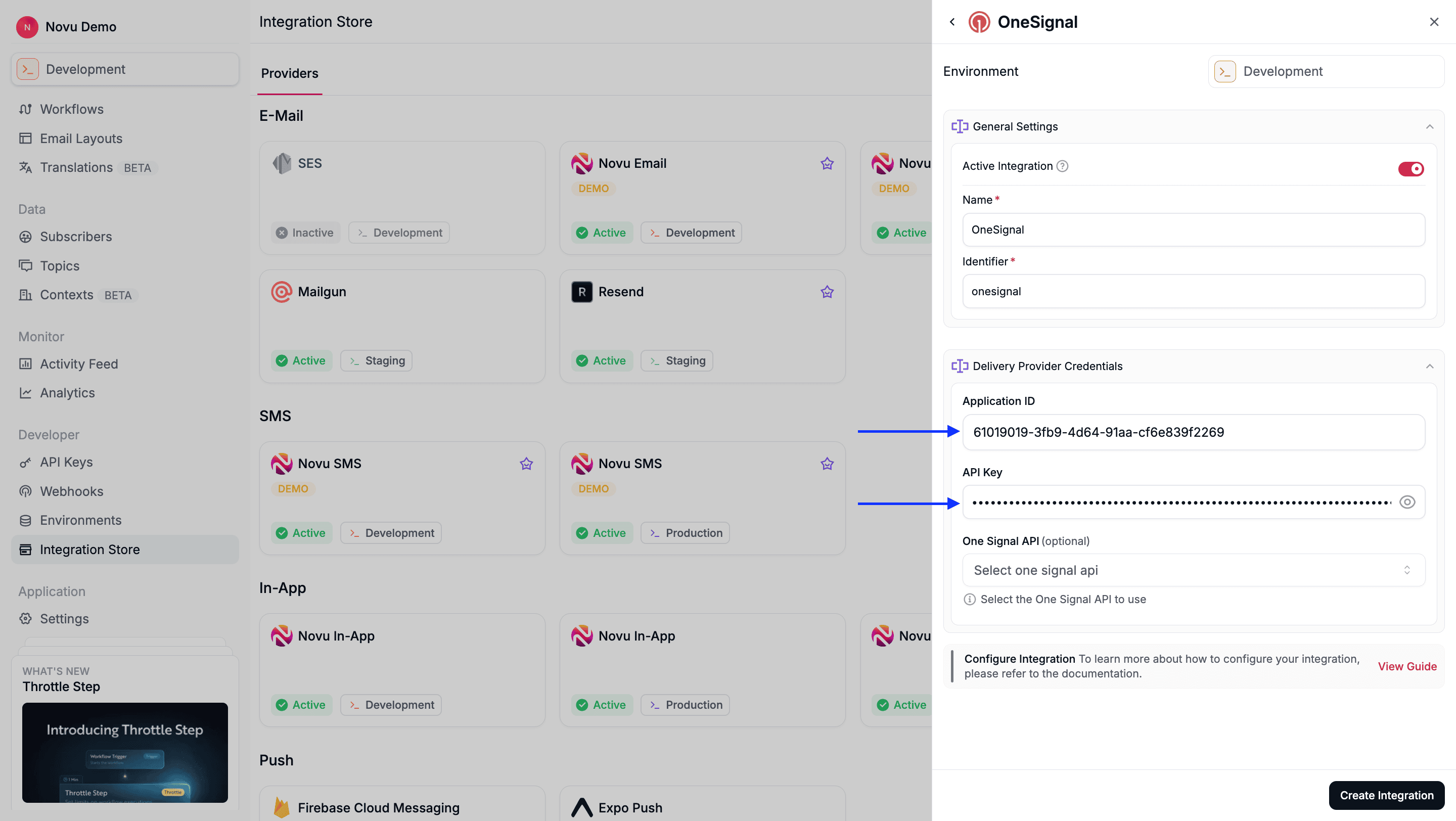 Review your credentials, then click **Create Integration** to save.
## Using Onesignal with Novu
Once your integration is configured, you can start sending push notifications by registering your subscribers' `player_id` tokens and triggering a workflow.
### Step 1: Add subscriber device token
When you [set up the OneSignal SDK](https://documentation.onesignal.com/docs/onboarding-with-onesignal#step-1-setup-onesignal-sdk) in your application, your users are automatically assigned a unique OneSignal [`player_id`](https://documentation.onesignal.com/docs/users#player-id). This ID is used to target the user for push notifications.
To target a OneSignal user from Novu, you must register their `player_id` as the `deviceToken` for their Novu subscriber profile.
You can do this by making an API call to [update the subscriber's credentials](/api-reference/subscribers/update-provider-credentials).
```typescript theme={null}
import { Novu } from '@novu/api';
import { ChatOrPushProviderEnum } from "@novu/api/models/components";
const novu = new Novu({ secretKey: "" });
await novu.subscribers.credentials.update(
{
providerId: ChatOrPushProviderEnum.OneSignal,
integrationIdentifier: "string",
credentials: { deviceTokens: ["token1", "token2", "token3"] },
},
"subscriberId"
);
```
```python theme={null}
import os
import novu_py
from novu_py import Novu
with Novu(secret_key=os.getenv("NOVU_SECRET_KEY", "")) as novu:
novu.subscribers.credentials.update(
subscriber_id="subscriberId",
update_subscriber_channel_request_dto={
"provider_id": novu_py.ChatOrPushProviderEnum.ONESIGNAL,
"credentials": {"deviceTokens": ["token1", "token2", "token3"]},
"integration_identifier": "string",
},
)
```
```go theme={null}
import (
"context"
"os"
novugo "github.com/novuhq/novu-go"
"github.com/novuhq/novu-go/models/components"
)
s := novugo.New(novugo.WithSecurity(os.Getenv("NOVU_SECRET_KEY")))
res, err := s.Subscribers.Credentials.Update(context.Background(), "subscriberId", components.UpdateSubscriberChannelRequestDto{
ProviderID: components.ChatOrPushProviderEnumOneSignal,
IntegrationIdentifier: novugo.String("string"),
Credentials: components.ChannelCredentials{
DeviceTokens: []string{"token1", "token2", "token3"},
},
}, nil)
```
```php theme={null}
use novu;
use novu\Models\Components;
$sdk = novu\Novu::builder()->setSecurity('')->build();
$sdk->subscribersCredentials->update(
subscriberId: 'subscriberId',
updateSubscriberChannelRequestDto: new Components\UpdateSubscriberChannelRequestDto(
providerId: Components\ChatOrPushProviderEnum::OneSignal,
integrationIdentifier: 'string',
credentials: new Components\ChannelCredentials(
deviceTokens: ['token1', 'token2', 'token3'],
),
),
);
```
```csharp theme={null}
using Novu;
using Novu.Models.Components;
using System.Collections.Generic;
var sdk = new NovuSDK(secretKey: "");
await sdk.Subscribers.Credentials.UpdateAsync(
subscriberId: "subscriberId",
updateSubscriberChannelRequestDto: new UpdateSubscriberChannelRequestDto() {
ProviderId = ChatOrPushProviderEnum.OneSignal,
IntegrationIdentifier = "string",
Credentials = new ChannelCredentials() {
DeviceTokens = new List { "token1", "token2", "token3" },
},
});
```
```java theme={null}
import co.novu.Novu;
import co.novu.models.components.*;
import java.util.List;
Novu novu = Novu.builder().secretKey("").build();
novu.subscribers().credentials().update()
.subscriberId("subscriberId")
.body(UpdateSubscriberChannelRequestDto.builder()
.providerId(ChatOrPushProviderEnum.ONESIGNAL)
.integrationIdentifier("string")
.credentials(ChannelCredentials.builder()
.deviceTokens(List.of("token1", "token2", "token3"))
.build())
.build())
.call();
```
```bash theme={null}
curl -L -X PUT 'https://api.novu.co/v1/subscribers//credentials' \
-H 'Content-Type: application/json' \
-H 'Authorization: ApiKey ' \
-d '{
"providerId": "one-signal",
"credentials": {
"deviceTokens": [
"token1",
"token2",
"token3"
]
},
"integrationIdentifier": "string"
}'
```
### Step 2: Send a notification
```typescript theme={null}
import { Novu } from '@novu/api';
const novu = new Novu({ secretKey: "" });
await novu.trigger({
workflowId: "workflowId",
to: { subscriberId: "SUBSCRIBER_ID", },
payload: {},
});
```
```python theme={null}
import os
import novu_py
from novu_py import Novu
with Novu(secret_key=os.getenv("NOVU_SECRET_KEY", "")) as novu:
novu.trigger(trigger_event_request_dto=novu_py.TriggerEventRequestDto(
workflow_id="workflowId",
to={"subscriber_id": "SUBSCRIBER_ID"},
payload={},
))
```
```go theme={null}
import (
"context"
"os"
novugo "github.com/novuhq/novu-go"
"github.com/novuhq/novu-go/models/components"
)
s := novugo.New(novugo.WithSecurity(os.Getenv("NOVU_SECRET_KEY")))
res, err := s.Trigger(context.Background(), components.TriggerEventRequestDto{
WorkflowID: "workflowId",
To: components.CreateToSubscriberPayloadDto(components.SubscriberPayloadDto{
SubscriberID: "SUBSCRIBER_ID",
}),
Payload: map[string]any{},
}, nil)
```
```php theme={null}
use novu;
use novu\Models\Components;
$sdk = novu\Novu::builder()->setSecurity('')->build();
$sdk->trigger(
triggerEventRequestDto: new Components\TriggerEventRequestDto(
workflowId: 'workflowId',
to: new Components\SubscriberPayloadDto(subscriberId: 'SUBSCRIBER_ID'),
payload: {},
),
);
```
```csharp theme={null}
using Novu;
using Novu.Models.Components;
var sdk = new NovuSDK(secretKey: "");
await sdk.TriggerAsync(triggerEventRequestDto: new TriggerEventRequestDto() {
WorkflowId = "workflowId",
To = To.CreateSubscriberPayloadDto(new SubscriberPayloadDto() { SubscriberId = "SUBSCRIBER_ID" }),
Payload = {},
});
```
```java theme={null}
import co.novu.Novu;
import co.novu.models.components.*;
Novu novu = Novu.builder().secretKey("").build();
novu.trigger()
.body(TriggerEventRequestDto.builder()
.workflowId("workflowId")
.to(To2.of(SubscriberPayloadDto.builder().subscriberId("SUBSCRIBER_ID").build()))
.payload({})
.build())
.call();
```
```bash theme={null}
curl --location 'https://api.novu.co/v1/events/trigger' \
--header 'Content-Type: application/json' \
--header 'Authorization: ApiKey ' \
-d '{
"name": "workflowId",
"to": [
"SUBSCRIBER_ID"
],
"payload": {}
}'
```
## Using overrides to customize notifications
To customize a single notification, send OneSignal fields under `overrides.providers['one-signal']` when you trigger the workflow. Novu deep-merges that object into the [Create notification](https://documentation.onesignal.com/reference/create-notification) request body it builds from the Push step's Subject and Body, so the fields you send win over the generated ones.
The override is an unvalidated passthrough, so copy field names from OneSignal's API reference. Novu snake-cases the keys before sending, so `androidChannelId` also arrives as `android_channel_id`.
Novu only reads provider fields under `overrides.providers`. Keys at the root of `overrides` are ignored. `channelId`, `categoryId`, `icon`, and `sound` are not OneSignal fields, so they do nothing under `providers` either — use `android_channel_id`, `ios_category`, `large_icon`, and `ios_sound` / `android_sound` instead, and send `subtitle` as a language map such as `{ "en": "Order #12345" }`.
```typescript theme={null}
import { Novu } from '@novu/api';
const novu = new Novu({ secretKey: "" });
await novu.trigger({
workflowId: "workflowId",
to: { subscriberId: "subscriberId", },
payload: {
"abc": "def"
},
overrides: {
providers: {
"one-signal": {
subtitle: { en: "Order #12345" },
mutable_content: true,
android_channel_id: "orders",
ios_category: "ORDER_UPDATE",
large_icon: "https://example.com/icon.png",
ios_sound: "default",
android_sound: "default",
},
},
},
});
```
```python theme={null}
import os
import novu_py
from novu_py import Novu
with Novu(secret_key=os.getenv("NOVU_SECRET_KEY", "")) as novu:
novu.trigger(trigger_event_request_dto=novu_py.TriggerEventRequestDto(
workflow_id="workflowId",
to={"subscriber_id": "subscriberId"},
payload={
"abc": "def"
},
overrides={
"providers": {
"one-signal": {
"subtitle": {"en": "Order #12345"},
"mutable_content": True,
"android_channel_id": "orders",
"ios_category": "ORDER_UPDATE",
"large_icon": "https://example.com/icon.png",
"ios_sound": "default",
"android_sound": "default",
},
},
},
))
```
```go theme={null}
import (
"context"
"os"
novugo "github.com/novuhq/novu-go"
"github.com/novuhq/novu-go/models/components"
)
s := novugo.New(novugo.WithSecurity(os.Getenv("NOVU_SECRET_KEY")))
res, err := s.Trigger(context.Background(), components.TriggerEventRequestDto{
WorkflowID: "workflowId",
To: components.CreateToSubscriberPayloadDto(components.SubscriberPayloadDto{
SubscriberID: "subscriberId",
}),
Payload: map[string]any{
"abc": "def",
},
Overrides: map[string]map[string]any{
"providers": {
"one-signal": map[string]any{
"subtitle": map[string]any{"en": "Order #12345"},
"mutable_content": true,
"android_channel_id": "orders",
"ios_category": "ORDER_UPDATE",
"large_icon": "https://example.com/icon.png",
"ios_sound": "default",
"android_sound": "default",
},
},
},
}, nil)
```
```php theme={null}
use novu;
use novu\Models\Components;
$sdk = novu\Novu::builder()->setSecurity('')->build();
$sdk->trigger(
triggerEventRequestDto: new Components\TriggerEventRequestDto(
workflowId: 'workflowId',
to: new Components\SubscriberPayloadDto(subscriberId: 'subscriberId'),
payload: ['abc' => 'def'],
overrides: [
'providers' => [
'one-signal' => [
'subtitle' => ['en' => 'Order #12345'],
'mutable_content' => true,
'android_channel_id' => 'orders',
'ios_category' => 'ORDER_UPDATE',
'large_icon' => 'https://example.com/icon.png',
'ios_sound' => 'default',
'android_sound' => 'default',
],
],
],
),
);
```
```csharp theme={null}
using Novu;
using Novu.Models.Components;
using System.Collections.Generic;
var sdk = new NovuSDK(secretKey: "");
await sdk.TriggerAsync(triggerEventRequestDto: new TriggerEventRequestDto() {
WorkflowId = "workflowId",
To = To.CreateSubscriberPayloadDto(new SubscriberPayloadDto() { SubscriberId = "subscriberId" }),
Payload = new Dictionary() {
{ "abc", "def" },
},
Overrides = new Overrides() {
Providers = new Dictionary>() {
{ "one-signal", new Dictionary() {
{ "subtitle", new Dictionary() { { "en", "Order #12345" } } },
{ "mutable_content", true },
{ "android_channel_id", "orders" },
{ "ios_category", "ORDER_UPDATE" },
{ "large_icon", "https://example.com/icon.png" },
{ "ios_sound", "default" },
{ "android_sound", "default" },
} },
},
},
});
```
```java theme={null}
import co.novu.Novu;
import co.novu.models.components.*;
import java.util.Map;
Novu novu = Novu.builder().secretKey("").build();
novu.trigger()
.body(TriggerEventRequestDto.builder()
.workflowId("workflowId")
.to(To2.of(SubscriberPayloadDto.builder().subscriberId("subscriberId").build()))
.payload(Map.of("abc", "def"))
.overrides(TriggerEventRequestDtoOverrides.builder()
.additionalProperties(Map.of("providers", Map.of("one-signal", Map.ofEntries(
Map.entry("subtitle", Map.of("en", "Order #12345")),
Map.entry("mutable_content", true),
Map.entry("android_channel_id", "orders"),
Map.entry("ios_category", "ORDER_UPDATE"),
Map.entry("large_icon", "https://example.com/icon.png"),
Map.entry("ios_sound", "default"),
Map.entry("android_sound", "default")))))
.build())
.build())
.call();
```
```bash theme={null}
curl --location 'https://api.novu.co/v1/events/trigger' \
--header 'Content-Type: application/json' \
--header 'Authorization: ApiKey ' \
-d '{
"name": "workflowId",
"to": [
"subscriberId"
],
"payload": {
"abc": "def"
},
"overrides": {
"providers": {
"one-signal": {
"subtitle": { "en": "Order #12345" },
"mutable_content": true,
"android_channel_id": "orders",
"ios_category": "ORDER_UPDATE",
"large_icon": "https://example.com/icon.png",
"ios_sound": "default",
"android_sound": "default"
}
}
}
}'
```
You can also save the same object on the Push step in the workflow editor as a [provider content override](/platform/integrations/push#provider-content-overrides), which keeps it versioned with the workflow instead of repeating it on every trigger. Both land on the same OneSignal blob. Trigger overrides take precedence over the saved object: objects merge key by key, and arrays replace.
## Using external user ID
By default, Novu uses `player_id` to send notifications, but you can select the `External ID` option in the OneSignal integration settings in Novu. If `External ID` option is selected, then `deviceTokens` stored in subscriber credentials for the OneSignal provider, are used as external user IDs.
By default, Novu uses player IDs to send notifications. If your OneSignal integration uses external user IDs, then you can switch this behavior in the OneSignal integration settings in Novu.
Once enabled, the `deviceTokens` stored in subscriber credentials are treated as external user IDs instead of player IDs.
This documentation is built and hosted on [Mintlify](https://mintlify.com), a developer documentation platform.
Review your credentials, then click **Create Integration** to save.
## Using Onesignal with Novu
Once your integration is configured, you can start sending push notifications by registering your subscribers' `player_id` tokens and triggering a workflow.
### Step 1: Add subscriber device token
When you [set up the OneSignal SDK](https://documentation.onesignal.com/docs/onboarding-with-onesignal#step-1-setup-onesignal-sdk) in your application, your users are automatically assigned a unique OneSignal [`player_id`](https://documentation.onesignal.com/docs/users#player-id). This ID is used to target the user for push notifications.
To target a OneSignal user from Novu, you must register their `player_id` as the `deviceToken` for their Novu subscriber profile.
You can do this by making an API call to [update the subscriber's credentials](/api-reference/subscribers/update-provider-credentials).
```typescript theme={null}
import { Novu } from '@novu/api';
import { ChatOrPushProviderEnum } from "@novu/api/models/components";
const novu = new Novu({ secretKey: "" });
await novu.subscribers.credentials.update(
{
providerId: ChatOrPushProviderEnum.OneSignal,
integrationIdentifier: "string",
credentials: { deviceTokens: ["token1", "token2", "token3"] },
},
"subscriberId"
);
```
```python theme={null}
import os
import novu_py
from novu_py import Novu
with Novu(secret_key=os.getenv("NOVU_SECRET_KEY", "")) as novu:
novu.subscribers.credentials.update(
subscriber_id="subscriberId",
update_subscriber_channel_request_dto={
"provider_id": novu_py.ChatOrPushProviderEnum.ONESIGNAL,
"credentials": {"deviceTokens": ["token1", "token2", "token3"]},
"integration_identifier": "string",
},
)
```
```go theme={null}
import (
"context"
"os"
novugo "github.com/novuhq/novu-go"
"github.com/novuhq/novu-go/models/components"
)
s := novugo.New(novugo.WithSecurity(os.Getenv("NOVU_SECRET_KEY")))
res, err := s.Subscribers.Credentials.Update(context.Background(), "subscriberId", components.UpdateSubscriberChannelRequestDto{
ProviderID: components.ChatOrPushProviderEnumOneSignal,
IntegrationIdentifier: novugo.String("string"),
Credentials: components.ChannelCredentials{
DeviceTokens: []string{"token1", "token2", "token3"},
},
}, nil)
```
```php theme={null}
use novu;
use novu\Models\Components;
$sdk = novu\Novu::builder()->setSecurity('')->build();
$sdk->subscribersCredentials->update(
subscriberId: 'subscriberId',
updateSubscriberChannelRequestDto: new Components\UpdateSubscriberChannelRequestDto(
providerId: Components\ChatOrPushProviderEnum::OneSignal,
integrationIdentifier: 'string',
credentials: new Components\ChannelCredentials(
deviceTokens: ['token1', 'token2', 'token3'],
),
),
);
```
```csharp theme={null}
using Novu;
using Novu.Models.Components;
using System.Collections.Generic;
var sdk = new NovuSDK(secretKey: "");
await sdk.Subscribers.Credentials.UpdateAsync(
subscriberId: "subscriberId",
updateSubscriberChannelRequestDto: new UpdateSubscriberChannelRequestDto() {
ProviderId = ChatOrPushProviderEnum.OneSignal,
IntegrationIdentifier = "string",
Credentials = new ChannelCredentials() {
DeviceTokens = new List { "token1", "token2", "token3" },
},
});
```
```java theme={null}
import co.novu.Novu;
import co.novu.models.components.*;
import java.util.List;
Novu novu = Novu.builder().secretKey("").build();
novu.subscribers().credentials().update()
.subscriberId("subscriberId")
.body(UpdateSubscriberChannelRequestDto.builder()
.providerId(ChatOrPushProviderEnum.ONESIGNAL)
.integrationIdentifier("string")
.credentials(ChannelCredentials.builder()
.deviceTokens(List.of("token1", "token2", "token3"))
.build())
.build())
.call();
```
```bash theme={null}
curl -L -X PUT 'https://api.novu.co/v1/subscribers//credentials' \
-H 'Content-Type: application/json' \
-H 'Authorization: ApiKey ' \
-d '{
"providerId": "one-signal",
"credentials": {
"deviceTokens": [
"token1",
"token2",
"token3"
]
},
"integrationIdentifier": "string"
}'
```
### Step 2: Send a notification
```typescript theme={null}
import { Novu } from '@novu/api';
const novu = new Novu({ secretKey: "" });
await novu.trigger({
workflowId: "workflowId",
to: { subscriberId: "SUBSCRIBER_ID", },
payload: {},
});
```
```python theme={null}
import os
import novu_py
from novu_py import Novu
with Novu(secret_key=os.getenv("NOVU_SECRET_KEY", "")) as novu:
novu.trigger(trigger_event_request_dto=novu_py.TriggerEventRequestDto(
workflow_id="workflowId",
to={"subscriber_id": "SUBSCRIBER_ID"},
payload={},
))
```
```go theme={null}
import (
"context"
"os"
novugo "github.com/novuhq/novu-go"
"github.com/novuhq/novu-go/models/components"
)
s := novugo.New(novugo.WithSecurity(os.Getenv("NOVU_SECRET_KEY")))
res, err := s.Trigger(context.Background(), components.TriggerEventRequestDto{
WorkflowID: "workflowId",
To: components.CreateToSubscriberPayloadDto(components.SubscriberPayloadDto{
SubscriberID: "SUBSCRIBER_ID",
}),
Payload: map[string]any{},
}, nil)
```
```php theme={null}
use novu;
use novu\Models\Components;
$sdk = novu\Novu::builder()->setSecurity('')->build();
$sdk->trigger(
triggerEventRequestDto: new Components\TriggerEventRequestDto(
workflowId: 'workflowId',
to: new Components\SubscriberPayloadDto(subscriberId: 'SUBSCRIBER_ID'),
payload: {},
),
);
```
```csharp theme={null}
using Novu;
using Novu.Models.Components;
var sdk = new NovuSDK(secretKey: "");
await sdk.TriggerAsync(triggerEventRequestDto: new TriggerEventRequestDto() {
WorkflowId = "workflowId",
To = To.CreateSubscriberPayloadDto(new SubscriberPayloadDto() { SubscriberId = "SUBSCRIBER_ID" }),
Payload = {},
});
```
```java theme={null}
import co.novu.Novu;
import co.novu.models.components.*;
Novu novu = Novu.builder().secretKey("").build();
novu.trigger()
.body(TriggerEventRequestDto.builder()
.workflowId("workflowId")
.to(To2.of(SubscriberPayloadDto.builder().subscriberId("SUBSCRIBER_ID").build()))
.payload({})
.build())
.call();
```
```bash theme={null}
curl --location 'https://api.novu.co/v1/events/trigger' \
--header 'Content-Type: application/json' \
--header 'Authorization: ApiKey ' \
-d '{
"name": "workflowId",
"to": [
"SUBSCRIBER_ID"
],
"payload": {}
}'
```
## Using overrides to customize notifications
To customize a single notification, send OneSignal fields under `overrides.providers['one-signal']` when you trigger the workflow. Novu deep-merges that object into the [Create notification](https://documentation.onesignal.com/reference/create-notification) request body it builds from the Push step's Subject and Body, so the fields you send win over the generated ones.
The override is an unvalidated passthrough, so copy field names from OneSignal's API reference. Novu snake-cases the keys before sending, so `androidChannelId` also arrives as `android_channel_id`.
Novu only reads provider fields under `overrides.providers`. Keys at the root of `overrides` are ignored. `channelId`, `categoryId`, `icon`, and `sound` are not OneSignal fields, so they do nothing under `providers` either — use `android_channel_id`, `ios_category`, `large_icon`, and `ios_sound` / `android_sound` instead, and send `subtitle` as a language map such as `{ "en": "Order #12345" }`.
```typescript theme={null}
import { Novu } from '@novu/api';
const novu = new Novu({ secretKey: "" });
await novu.trigger({
workflowId: "workflowId",
to: { subscriberId: "subscriberId", },
payload: {
"abc": "def"
},
overrides: {
providers: {
"one-signal": {
subtitle: { en: "Order #12345" },
mutable_content: true,
android_channel_id: "orders",
ios_category: "ORDER_UPDATE",
large_icon: "https://example.com/icon.png",
ios_sound: "default",
android_sound: "default",
},
},
},
});
```
```python theme={null}
import os
import novu_py
from novu_py import Novu
with Novu(secret_key=os.getenv("NOVU_SECRET_KEY", "")) as novu:
novu.trigger(trigger_event_request_dto=novu_py.TriggerEventRequestDto(
workflow_id="workflowId",
to={"subscriber_id": "subscriberId"},
payload={
"abc": "def"
},
overrides={
"providers": {
"one-signal": {
"subtitle": {"en": "Order #12345"},
"mutable_content": True,
"android_channel_id": "orders",
"ios_category": "ORDER_UPDATE",
"large_icon": "https://example.com/icon.png",
"ios_sound": "default",
"android_sound": "default",
},
},
},
))
```
```go theme={null}
import (
"context"
"os"
novugo "github.com/novuhq/novu-go"
"github.com/novuhq/novu-go/models/components"
)
s := novugo.New(novugo.WithSecurity(os.Getenv("NOVU_SECRET_KEY")))
res, err := s.Trigger(context.Background(), components.TriggerEventRequestDto{
WorkflowID: "workflowId",
To: components.CreateToSubscriberPayloadDto(components.SubscriberPayloadDto{
SubscriberID: "subscriberId",
}),
Payload: map[string]any{
"abc": "def",
},
Overrides: map[string]map[string]any{
"providers": {
"one-signal": map[string]any{
"subtitle": map[string]any{"en": "Order #12345"},
"mutable_content": true,
"android_channel_id": "orders",
"ios_category": "ORDER_UPDATE",
"large_icon": "https://example.com/icon.png",
"ios_sound": "default",
"android_sound": "default",
},
},
},
}, nil)
```
```php theme={null}
use novu;
use novu\Models\Components;
$sdk = novu\Novu::builder()->setSecurity('')->build();
$sdk->trigger(
triggerEventRequestDto: new Components\TriggerEventRequestDto(
workflowId: 'workflowId',
to: new Components\SubscriberPayloadDto(subscriberId: 'subscriberId'),
payload: ['abc' => 'def'],
overrides: [
'providers' => [
'one-signal' => [
'subtitle' => ['en' => 'Order #12345'],
'mutable_content' => true,
'android_channel_id' => 'orders',
'ios_category' => 'ORDER_UPDATE',
'large_icon' => 'https://example.com/icon.png',
'ios_sound' => 'default',
'android_sound' => 'default',
],
],
],
),
);
```
```csharp theme={null}
using Novu;
using Novu.Models.Components;
using System.Collections.Generic;
var sdk = new NovuSDK(secretKey: "");
await sdk.TriggerAsync(triggerEventRequestDto: new TriggerEventRequestDto() {
WorkflowId = "workflowId",
To = To.CreateSubscriberPayloadDto(new SubscriberPayloadDto() { SubscriberId = "subscriberId" }),
Payload = new Dictionary() {
{ "abc", "def" },
},
Overrides = new Overrides() {
Providers = new Dictionary>() {
{ "one-signal", new Dictionary() {
{ "subtitle", new Dictionary() { { "en", "Order #12345" } } },
{ "mutable_content", true },
{ "android_channel_id", "orders" },
{ "ios_category", "ORDER_UPDATE" },
{ "large_icon", "https://example.com/icon.png" },
{ "ios_sound", "default" },
{ "android_sound", "default" },
} },
},
},
});
```
```java theme={null}
import co.novu.Novu;
import co.novu.models.components.*;
import java.util.Map;
Novu novu = Novu.builder().secretKey("").build();
novu.trigger()
.body(TriggerEventRequestDto.builder()
.workflowId("workflowId")
.to(To2.of(SubscriberPayloadDto.builder().subscriberId("subscriberId").build()))
.payload(Map.of("abc", "def"))
.overrides(TriggerEventRequestDtoOverrides.builder()
.additionalProperties(Map.of("providers", Map.of("one-signal", Map.ofEntries(
Map.entry("subtitle", Map.of("en", "Order #12345")),
Map.entry("mutable_content", true),
Map.entry("android_channel_id", "orders"),
Map.entry("ios_category", "ORDER_UPDATE"),
Map.entry("large_icon", "https://example.com/icon.png"),
Map.entry("ios_sound", "default"),
Map.entry("android_sound", "default")))))
.build())
.build())
.call();
```
```bash theme={null}
curl --location 'https://api.novu.co/v1/events/trigger' \
--header 'Content-Type: application/json' \
--header 'Authorization: ApiKey ' \
-d '{
"name": "workflowId",
"to": [
"subscriberId"
],
"payload": {
"abc": "def"
},
"overrides": {
"providers": {
"one-signal": {
"subtitle": { "en": "Order #12345" },
"mutable_content": true,
"android_channel_id": "orders",
"ios_category": "ORDER_UPDATE",
"large_icon": "https://example.com/icon.png",
"ios_sound": "default",
"android_sound": "default"
}
}
}
}'
```
You can also save the same object on the Push step in the workflow editor as a [provider content override](/platform/integrations/push#provider-content-overrides), which keeps it versioned with the workflow instead of repeating it on every trigger. Both land on the same OneSignal blob. Trigger overrides take precedence over the saved object: objects merge key by key, and arrays replace.
## Using external user ID
By default, Novu uses `player_id` to send notifications, but you can select the `External ID` option in the OneSignal integration settings in Novu. If `External ID` option is selected, then `deviceTokens` stored in subscriber credentials for the OneSignal provider, are used as external user IDs.
By default, Novu uses player IDs to send notifications. If your OneSignal integration uses external user IDs, then you can switch this behavior in the OneSignal integration settings in Novu.
Once enabled, the `deviceTokens` stored in subscriber credentials are treated as external user IDs instead of player IDs.
This documentation is built and hosted on [Mintlify](https://mintlify.com), a developer documentation platform.